Filter administrative and sign-in activity, then export the matching events as a CSV file. You must be an Owner or Administrator.
Choose a Reporting Period
Northstar retains events for 90 days. The default range covers the last seven UTC calendar dates, including today. Custom ranges include both the start and end date, cannot include future dates, and must stay within the retained period.
Filter Activity
- Select Activity reports in the sidebar.
- Choose a Date range. For Custom, enter the Start date and End date.
- Choose an Actor and Category, or leave them unrestricted.
- Select Apply filters.
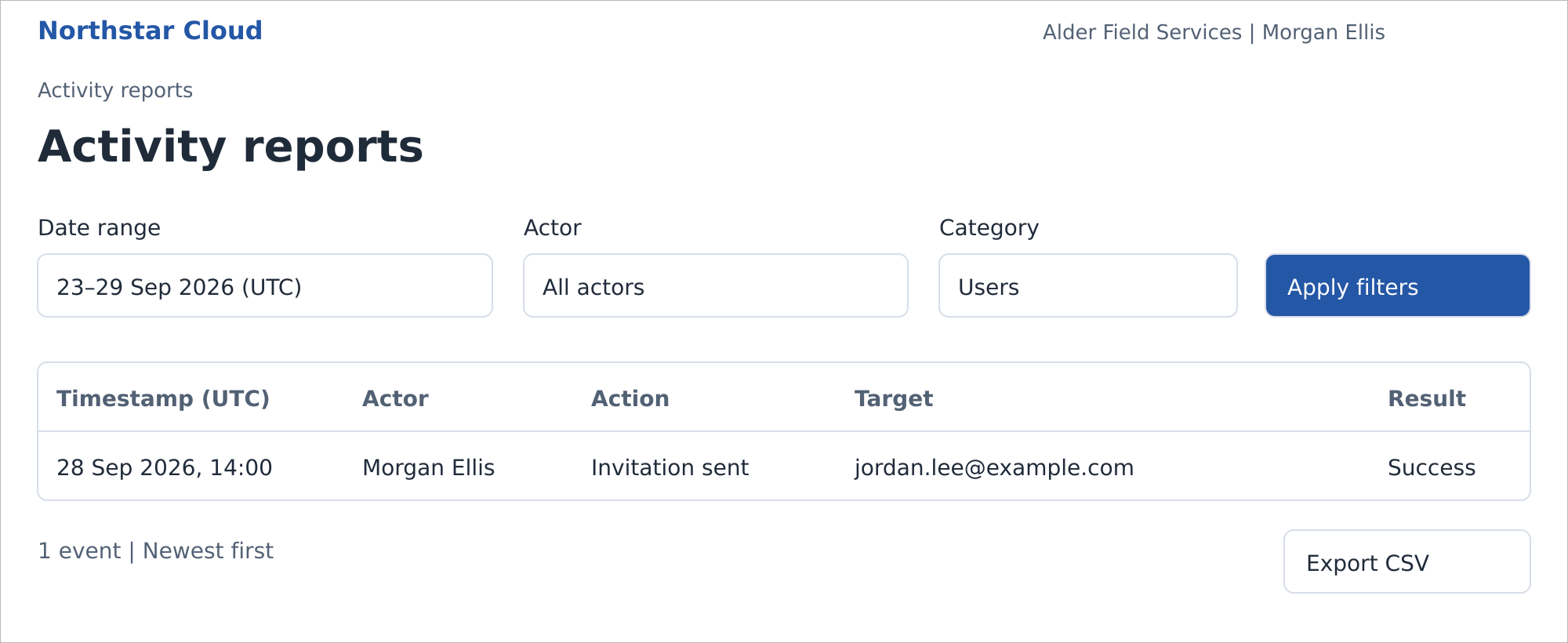
Activity filtered to Users for 23–29 September 2026 UTC. Northstar Cloud 1.0 — fictional product mockup.
Results appear newest first, with 25 rows per page. The table shows Timestamp (UTC), Actor, Action, Target, and Result. Results are Success or Failure.
If No activity found appears, broaden the dates or remove an actor or category filter, then select Apply filters again. Export CSV is unavailable when no events match.
Export the Filtered Result
- Review the active filters and select Apply filters if you have changed them.
- Select Export CSV.
The CSV contains every event matching the applied filters, not just the visible page. Timestamps use ISO 8601 UTC. The export action is recorded after the export dataset is captured, so the export does not contain its own activity event.
Choose a Category
| Category | Events included |
|---|---|
| Users | Invitation actions, account activation, and role or status changes. |
| Teams | Team and membership changes. |
| Authentication | SSO changes, local MFA policy and enrollment or reset changes, and sign-in successes or failures. |
| Organization | Organization-name changes. |
| Reports | CSV exports. |
| All categories | All of the categories above. |
Understand Report Limits
Personal name edits and notification-preference changes are not recorded in this version. Unknown identities in failed sign-ins appear as Unknown user; attempted email addresses are not exposed.
Passwords, tokens, certificates, and MFA secrets are not report fields. Reports do not provide scheduled delivery or a custom report builder.
Related guides: Manage Users; Troubleshoot Sign-In Problems.